
Support
Email us at hello@assistanthabits.com if you can't find what you're looking for.
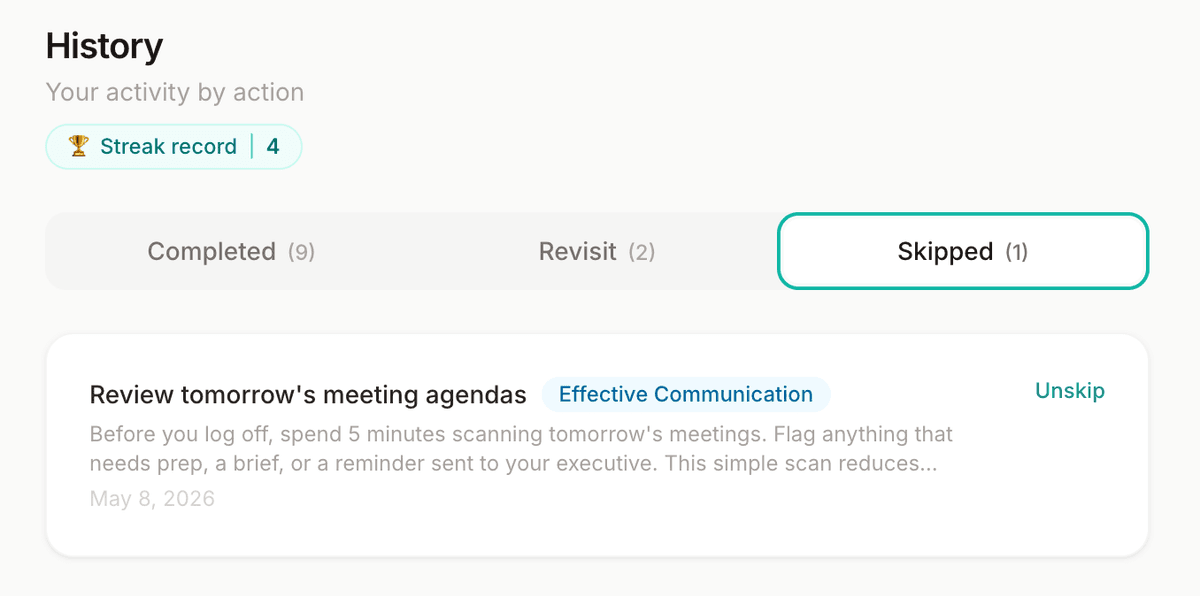
Changed your mind about a skipped action? You can restore it.
- Go to History (bottom nav)
- Tap the Skipped tab
- Find the action you want to restore
- Tap Unskip on the right side
The action will return to your available queue and may appear as a future daily action.
Pausing protects your streak during vacations or time away.
- Go to Account (top right of the app)
- Scroll to the Settings section
- Click Pause my streak
- Choose a duration: a set number of weekdays, a specific end date, or pause until you manually resume
- Click Confirm pause
To resume early, return to the same spot and click Resume now →
Settings
Get quick access by adding Assistant Habits to your iPhone or iPad home screen.
- Open assistanthabits.com/app in Safari
- Tap the Share button (box with arrow pointing up, at the bottom of the screen)
- Scroll down and tap Add to Home Screen
- Give it a name and tap Add
The app icon will appear on your home screen and open full-screen, just like a native app.
Get quick access by adding Assistant Habits to your Android home screen.
- Open assistanthabits.com/app in Chrome
- Tap the three-dot menu (⋮) in the top right
- Tap Add to Home screen or Install app
- Tap Add to confirm
The app icon will appear on your home screen and open full-screen, just like a native app.
- Go to Account (top right of the app)
- Scroll to the Activity Summary section
You'll see six stats: Days active, Total actions, Bonus actions, Current streak, Longest streak, and Skipped.
Activity Summary
Choose which weekdays you receive your daily action email.
- Go to Account (top right of the app)
- Scroll to the Settings section
- Under Email notifications, toggle the days you want emails
Changes save automatically. Deselect all days to pause email notifications entirely.
Settings
You'll receive emails on the selected weekdays.
- Go to Account (top right of the app)
- Scroll to the Security section
- Enter your new password in the New password field
- Click Update Password
Security
- Go to Account (top right of the app)
- Scroll to the Security section
- Enter your new email address in the New email address field
- Click Update Email
- Check your new email inbox for a confirmation link and click it to complete the change
Security
A full reset clears all your action history and streak. This cannot be undone.
- Go to Account (top right of the app)
- Scroll to the Settings section
- Click Reset all account actions (shown in red)
- Read the warning carefully
- Type ERASE ACTIVITY in the confirmation box
- Click Reset Now
Settings
Clears all action history and resets your streak.